
Screenshots
App details
- Updated
- July 4, 2011
- Requires
- Windows 7, Windows 10, Windows Vista, Wi...
- Developer
- Windows7Theme
- Category
- Mobile
SoftPas in:
This product is also available in the following languages:
About Ubuntu Linux Windows 7 Theme
Download Ubuntu Linux Windows 7 Theme – Ubuntu Aesthetic, High-Resolution Backgrounds, Desktop Customization
Overview
The Ubuntu Linux Windows 7 Theme is a desktop customization tool designed to bring the distinctive visual identity of the Ubuntu operating system to users of Windows 7. Its primary purpose is to enhance the user interface with vibrant, high-resolution imagery and a cohesive design language inspired by the Linux ecosystem. This theme caters to users who appreciate the clean, modern, and colorful aesthetic of Ubuntu but remain rooted in the Windows 7 environment. It solves the common desire to personalize one’s digital workspace without switching operating systems.
Target users include long-time Windows 7 users seeking a visual refresh, Linux enthusiasts who want to experience Ubuntu’s look on their current platform, and individuals interested in desktop personalization for productivity or creative expression. The theme is particularly relevant in the context of desktop customization utilities, where visual appeal and ease of use are key drivers of adoption.
The developer did not provide additional background information. However, the theme’s release date of July 4, 2011, places it within a period when desktop customization was gaining popularity, especially among users looking to personalize their Windows experience with alternative visual styles. While specific technical details are not available, the theme’s design focuses on compatibility with Windows 7 systems across a range of desktop and laptop displays.
Key Features & Functionality
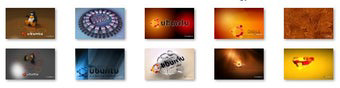
- High-Resolution Background Images: The theme includes 10 background images, each with a resolution of 1920 x 1200 pixels. These high-quality visuals are optimized for clarity and detail, ensuring sharp display on various screen sizes, from standard laptops to large desktop monitors.
- Ubuntu Aesthetic Design: The theme captures the signature color palette and visual motifs of the Ubuntu operating system, including the iconic blue gradient, clean typography, and nature-inspired elements. This allows users to immerse themselves in a Linux-inspired interface while remaining within the Windows 7 environment.
- Easy Installation Process: The theme is designed for straightforward application. Users can download the package and apply the theme with minimal steps, enabling an immediate visual transformation of the desktop interface.
- Customization Flexibility: While the theme comes with pre-selected backgrounds, users can manually switch between the included images or adjust other desktop settings such as window colors, icons, and cursor styles to further personalize their workspace.
For example, a user working on a 15-inch laptop can apply one of the high-resolution images to create a more engaging workspace, while a desktop user with a 24-inch monitor can enjoy the same image in full detail. The ability to cycle through multiple backgrounds adds variety and prevents visual fatigue over time.
Interface, UX & Performance
The interface of the Ubuntu Linux Windows 7 Theme is minimal and focused on visual presentation rather than interactive complexity. The user experience centers around the application of backgrounds and basic desktop adjustments. Navigation is intuitive, relying on standard Windows 7 desktop settings for theme management, which ensures accessibility for users of all technical levels.
Although the developer did not list formal performance metrics, the theme is designed to operate efficiently within the Windows 7 environment. It does not appear to include resource-intensive animations or dynamic effects, which helps maintain system responsiveness. The visual elements are static images, reducing strain on system resources and ensuring stable performance across different hardware configurations.
Responsiveness is consistent with standard Windows 7 behavior, as the theme integrates directly into the operating system’s native theming system. Stability is likely maintained due to the lightweight nature of the package. However, specific compatibility with older or low-end hardware was not disclosed.
Platform Compatibility & Technical Requirements
The Ubuntu Linux Windows 7 Theme is designed for the Windows 7 operating system. It is compatible with desktop and laptop devices running this platform. The file size of the theme package is not specified in the provided information.
The developer did not specify minimum OS requirements beyond the platform. It is assumed to function on all standard Windows 7 editions, including Home, Professional, and Ultimate. No information was provided regarding required RAM, processor speed, or graphics capabilities. Compatibility with 32-bit or 64-bit systems was not listed.
Users should ensure their system meets general Windows 7 standards for visual performance. The theme’s high-resolution images may require sufficient display resolution to be fully appreciated, though no specific screen size requirements were provided.
Pros and Cons
Pros
- Brings the distinctive Ubuntu visual style to Windows 7 users.
- Includes 10 high-resolution background images (1920 x 1200 pixels).
- Simple and fast installation process.
- Offers customization options for personalizing the desktop experience.
- Lightweight design with minimal impact on system performance.
Cons
- Specific technical requirements were not listed.
- Compatibility with newer operating systems was not confirmed.
- Does not include dynamic or animated elements.
- Developer background and support details were not provided.
- Theme may not be fully optimized for ultra-high-resolution displays beyond 1920 x 1200.
FAQ
Is the Ubuntu Linux Windows 7 Theme safe to download and install?
The theme is designed as a desktop customization package and does not include executable files or third-party software. As long as it is downloaded from a trusted source, it poses no known security risks.
Can I use this theme on Windows 10 or Windows 11?
The theme was specifically developed for Windows 7. While it may be possible to apply the image files manually, official compatibility with Windows 10 or 11 was not confirmed.
How do I install the theme?
Installation is straightforward. Download the theme package, extract the files, and apply the background images through the Windows 7 desktop settings. The process does not require advanced technical knowledge.
Are the background images customizable beyond switching?
Yes, users can manually adjust other desktop elements such as window colors, icon sets, and cursor styles to further personalize their workspace, though these changes are not part of the theme’s core package.
Does the theme require an internet connection after installation?
No, once installed, the theme operates offline. The images are stored locally and do not require continuous internet access.
Final Thoughts
The Ubuntu Linux Windows 7 Theme offers a compelling way to refresh the look of a Windows 7 desktop with the vibrant, modern aesthetic of the Ubuntu operating system. Its high-resolution imagery and clean design make it a valuable tool for users who value visual appeal and personalization. While it lacks advanced interactive features, its simplicity and ease of use ensure a smooth experience for all users.
It is particularly beneficial for long-time Windows 7 users, Linux fans, and anyone looking to enhance their digital workspace with a fresh, inspiring look. The theme delivers strong value as a lightweight, secure, and visually engaging utility.
Download Ubuntu Linux Windows 7 Theme now
Guides & Tutorials
How to install Ubuntu Linux Windows 7 Theme
- Click the Download button above.
- Once redirected, accept the terms and click Install.
- Wait for the Ubuntu Linux Windows 7 Theme download to finish on your device.
How to use Ubuntu Linux Windows 7 Theme
This software is primarily used for its core features described above. Open the app after installation to explore its capabilities.
User Reviews
No reviews yet. Be the first to share your experience.
You may also like
more
Que no te pillen¡
About !Que no te pillen¡Reviewed by Jason A. BilbreyShow MoreShow Less

3D Combat Zone
About 3D Combat ZoneOriginally released in 1983, 3D Combat Zone immerses players...

666: El día del portal
About 666: El día del portalOn June 6, 2006, Agent P. Stone uncovers a sinister...

80 in 1 Best Flash games
About 80 in 1 Best Flash games 80 in 1 Best Flash games is a collection of 80 fl...

ABYSS SEEKERーーWhat Do You See Deep in The Abyss
About ABYSS SEEKERーーWhat Do You See Deep in The AbyssIn ABYSS SEEKER, players...

ACA NEOGEO THE KING OF FIGHTERS 2002 for Windows
About ACA NEOGEO THE KING OF FIGHTERS 2002 for WindowsTHE KING OF FIGHTERS 2002,...